Hardware SDK Core Interface Notes
This guide covers the common calling methods of UKey Wallet Hardware SDK. From here you can learn how to obtain the device ID, how requests are executed serially, how to respond to UI events, and the common requirements for inputs and error handling of different link interfaces.
Quick Flow
- Call form: In examples, the SDK entry is usually referenced as
ukeySdk, so calls look likeukeySdk.method(connectId, deviceId?, params)and returnPromise<{ success, payload }>; inspectsuccessbefore usingpayload. - Device identification:
connectIdfromsearchDevices, used to locate the connection;deviceIdfromgetFeatures, used to confirm the current wallet status. The BLE scenario usually must be passed indeviceId, and the WebUSB scenario is also preferred. - Interaction event: The application entrance subscribes to
UI_EVENTonce.uiResponseis only called for events that require user input such as PIN, Passphrase, Bootloader device selection, etc. - Link Validation: HD Path is verified by chain; hidden wallet scenarios use
initSession + passphraseState; requests on the same device remain serial to avoid mutual preemption at the transport layer.
const opResult = await ukeySdk.evmGetAddress(connectId, deviceId, {
  path: "m/44'/60'/4'/0/1",
});

if (!opResult.success) throw new Error(opResult.payload.error);
console.log(opResult.payload.address);
Flow Diagram
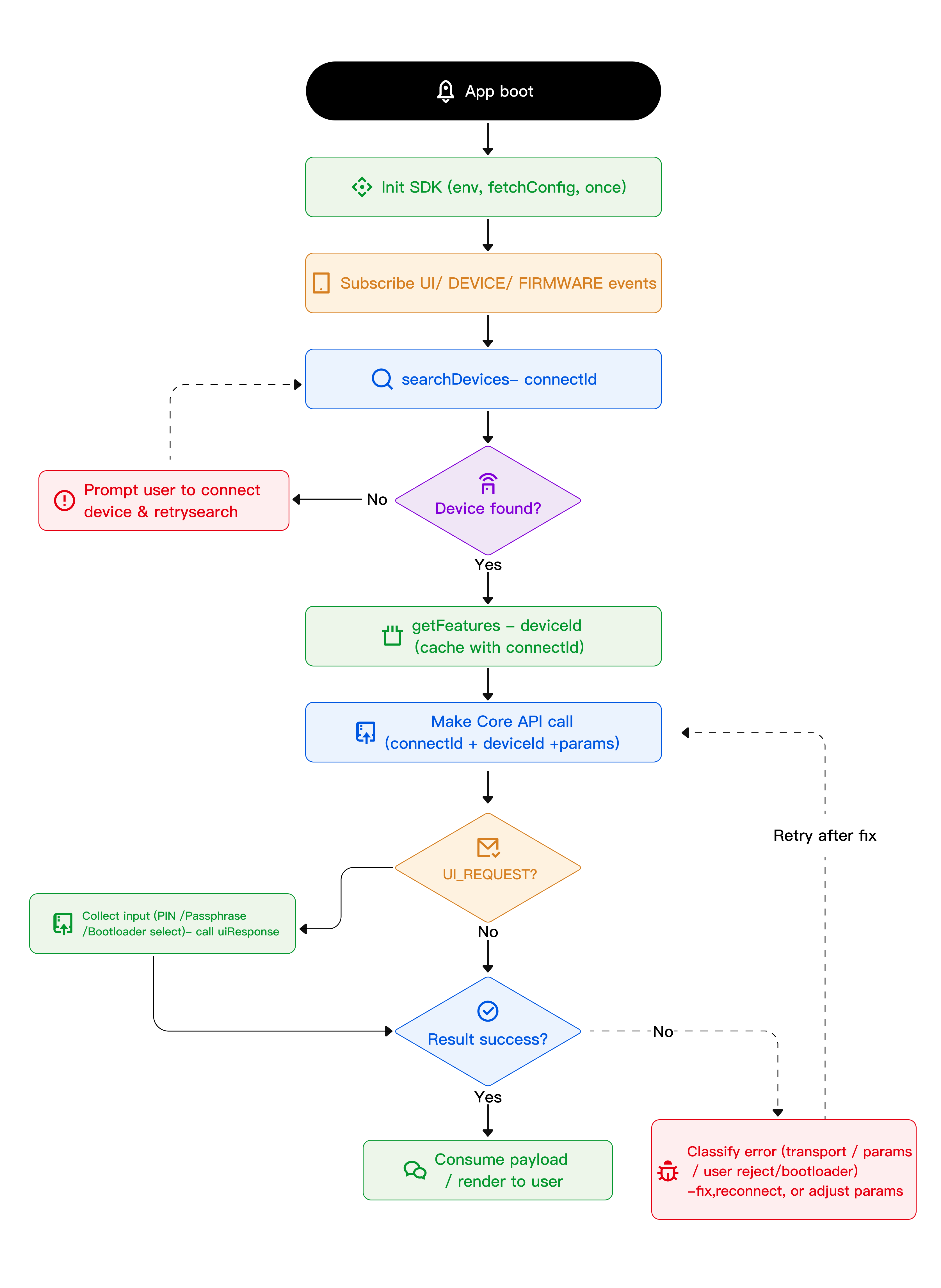
Core Identity and Environment
| Label | Purpose | Origin | Remarks |
|---|---|---|---|
connectId | Connection identifier, used to route requests to specific devices | searchDevices() | The same device usually remains stable; WebUSB/Bridge corresponds to the serial number in most cases; BLE uses system layer identification (Android MAC / iOS UUID). |
deviceId | Current wallet status identifier | getFeatures(connectId) | Changes after device reset, wipe, restore, or reseed; sensitive operations can be used to avoid requests being sent to the wrong wallet. |
- Cache
connectIdanddeviceIdin pairs; whenDeviceCheckDeviceIdErrorappears or the user restores the device or switches devices, callgetFeaturesagain. - SDK related packages need to be of the same version:
@ukeyfe/hardware-common-connect-sdk,@ukeyfe/hardware-core,@ukeyfe/hardware-sharedand should match the firmware and Bridge capabilities. - WebUSB requires HTTPS and user gestures; React Native BLE requires Bluetooth and platform permissions; the
lowlevelenvironment requires the host to implement 64-byte frame transmission and reception by itself. - Only some firmware interfaces are available in Bootloader mode; when using Bridge, please confirm that Bridge is running and the port is not occupied by other programs.
ID Requirements
| ID Scope | Purpose | Common Calls |
|---|---|---|
| 🟢 No identification required | SDK initialization, configuration, event management | init on/off searchDevices getLogs dispose uiResponse |
🟡 Just connectId | Device management, status query, firmware operation | getFeatures getPassphraseState cancel deviceSettings deviceReset |
🔵 Requires connectId + deviceId | Blockchain signature, address derivation, encryption and decryption | evmSignTransaction btcSignTransaction solanaSignMessage allNetworkGetAddress |
Suggested Order
Organize requests in a fixed order: Initialize SDK → Search for devices → Read device information → Subscribe to UI events → Perform specific operations → Release or clean up resources.
import ukeySdk, {
  UI_EVENT,
  UI_REQUEST,
  UI_RESPONSE,
} from "@ukeyfe/hardware-common-connect-sdk";

// 1. Initialize the SDK once at app startup
await ukeySdk.init({ env: "webusb", fetchConfig: true, debug: false });

// 2. Query the currently connected availableDevices
const availableDevices = await ukeySdk.searchDevices();
if (!availableDevices.length) throw new Error("No device");
const [{ connectId }] = availableDevices;

// 3. Read device details (mandatory for BLE, preferred for WebUSB)
const featureInfo = await ukeySdk.getFeatures(connectId);
const deviceId = featureInfo?.payload?.device_id;

// 4. Start listening for UI events
ukeySdk.on(UI_REQUEST.REQUEST_PIN, () => {
  // Present the PIN UI, then call uiResponse after collecting input
});
ukeySdk.on(UI_REQUEST.REQUEST_PASSPHRASE, () => {
  // Note: Show the passphrase prompt
});

// 5. Run a chain action (EVM signing is used here as the example)
await ukeySdk.evmSignTransaction(connectId, deviceId, {
  path: "m/44'/60'/4'/0/1",
});
Call reminder: Queue hardware requests for the same device instead of running them in parallel; after the user switches devices, read getFeatures again; detach event listeners before the page is destroyed; call ukeySdk.dispose() only when you really want to reset the transport context or close the SDK session.
Input Notes
Shared Request Fields (CommonParams)
| Field | Purpose | Typical use |
|---|---|---|
initSession?: boolean | Actively establish a hardware session, which can be used with the Passphrase state | Warm up the session before first operation to reduce subsequent interactions |
passphraseState?: string | Hide wallet session ID | Carry when using the same hidden wallet continuously |
useEmptyPassphrase?: boolean | Force the use of standard wallets | Avoid entering a hidden wallet by mistake |
deriveCardano?: boolean | Derive Cardano related data in advance | First Cardano operation in session |
retryCount? / pollIntervalTime? / timeout? | Adjust polling and timeout strategies | When BLE or network status is unstable |
detectBootloaderDevice?: boolean | Return quickly when bootloader device is detected | Guide the user to exit the bootloader |
skipWebDevicePrompt?: boolean | Skip WebUSB selection popup | Reuse an authorized WebUSB device |
keepSession? | Better avoid continuing to use | Prefer using session and passphrase state instead |
Combination example:
// Hidden wallet + sequential calls, so the user is not prompted again and again
const sessionOptions = {
  initSession: true,
  keepSession: true,
  passphraseState: "hidden-wallet-id",
};

await ukeySdk.evmSignMessage(connectId, deviceId, {
  path: "m/44'/60'/4'/0/1",
  messageHex,
  ...sessionOptions,
});
Transport Differences
| Transport mode | Common entry point | Key difference | Best suited for |
|---|---|---|---|
| WebUSB | env: "webusb" + @ukeyfe/hardware-common-connect-sdk | Pure browser access, no native bridge required; depends on HTTPS and a user gesture | Web sites, admin consoles, browser DApps |
| React Native BLE | env: "react-native" + @ukeyfe/hardware-ble-sdk + @ukeyfe/hardware-transport-react-native | Needs BLE native modules and Platform permissions; RN handles scan/connect/send/receive | Pure React Native apps |
| iOS native low-level | env: "lowlevel" + WKWebViewJavascriptBridge + CoreBluetooth | JS stays in WebView while native handles BLE and bridges results back | iOS native shell with a web business layer |
| Android native low-level | env: "lowlevel" + WebView + JSBridge + Nordic BLE | JS also stays in WebView while Android handles pairing, connection, notifications, and replies | Android native shell with a web business layer |
These transports share the same chain API call shape; the differences are mainly in initialization, permission requirements, and transport implementation.
Common Combinations
- Web app + WebUSB: the lightest path for direct browser-to-device access.
- React Native app + BLE: best for pure RN projects that need native BLE support.
- iOS native shell + WebView + CoreBluetooth: keep the web business layer while native owns BLE.
- Android native shell + WebView + Nordic BLE: similar to the iOS setup, with Android hosting the web page.
- Hidden wallet continuous calls + any transport: pair
initSession + passphraseStateto reduce repeated prompts.
Code Sample
// WebUSB
await ukeySdk.init({ env: "webusb", fetchConfig: true, debug: false });

// React Native BLE
await ukeySdk.init({ env: "react-native", fetchConfig: true, debug: __DEV__ });

// iOS / Android native low-level integration
await ukeySdk.init({ env: "lowlevel", debug: true });
HD Path Rules
path supports string or array form: path: string | number[]. Most chains follow the BIP44 idea, and different curves have different requirements for path hardening; for instance, Solana, NEAR, etc. ed25519 chains usually require fully hardened paths.
Path cheat sheet:
EVM:m/44'/60'/6'/0/2, the most common standard EVM account path.BTC (Nested SegWit):m/49'/0'/0'/0/0; Native SegWit usually shifts to84'.Solana:m/44'/501'/3'/0', and ed25519 chains like this usually require full hardening.NEAR:m/44'/397'/0'/0'/1', also fully hardened.Cardano:m/1852'/1815'/1'/0/1, with staking paths often using.../2/0.TRON:m/44'/195'/1'/0/1, which is fairly close to an EVM-style layout.
When passing a path as an array, hardened levels need the 0x80000000 marker, for example: [(44 | 0x80000000) >>> 0, (0 | 0x80000000) >>> 0, 0x80000000, 0, 0].
If a device returns "forbidden path", typically the path length, coin type, or hardening flag does not meet the chain's requirements. Please refer to the path rules in the corresponding chain API page.
Event Notes
The SDK will pass the device status and user interaction requirements to the application through events. Commonly used channels are as follows:
| Channel | Purpose |
|---|---|
UI_EVENT | User interaction prompts (PIN, Passphrase entry, etc.) |
DEVICE_EVENT | Device status changes (connection, disconnection, function update, etc.) |
FIRMWARE_EVENT | Firmware upgrade information |
uiResponseis only called byUI_REQUESTthat needs the application to echo the incoming content. Pure prompt events can be used to update the interface. In a multi-device scenario, please route the prompt to the corresponding device based on the device ID in the event.
UI Requests With Reply
| Request kind | When triggered | Reply |
|---|---|---|
REQUEST_PIN | Protected call while the device is locked | UI_RESPONSE.RECEIVE_PIN (software blind input or hardware-side entry) |
REQUEST_PASSPHRASE | Enter the hidden-wallet passphrase in the app | UI_RESPONSE.RECEIVE_PASSPHRASE (value, passphraseOnDevice, attachPinOnDevice, save) |
REQUEST_PASSPHRASE_ON_DEVICE | Enter the hidden-wallet passphrase on the device | UI_RESPONSE.RECEIVE_PASSPHRASE(passphraseOnDevice: true) |
REQUEST_DEVICE_IN_BOOTLOADER_FOR_WEB_DEVICE | Bootloader device selection | UI_RESPONSE.SELECT_DEVICE_IN_BOOTLOADER_FOR_WEB_DEVICE(deviceId) |
Display-Only UI Requests
| Request kind | Purpose |
|---|---|
REQUEST_BUTTON | Ask for confirmation on the device |
DEVICE_PROGRESS | long-running progress |
FIRMWARE_PROCESSING / FIRMWARE_PROGRESS / FIRMWARE_TIP | Firmware upgrade or processing state |
BLUETOOTH_PERMISSION / LOCATION_PERMISSION | BLE permission notice |
BOOTLOADER / REQUIRE_MODE / NOT_INITIALIZE / FIRMWARE_NOT_SUPPORTED | Mode / support hints |
Key Device/Firmware Events
Device State
CONNECT: Device is connected and available, refresh the list and auto-select it.DISCONNECT: Device unplugged or BLE disconnected, invalidate the session and prompt to reconnect.ACQUIRE: Transfer session starts, block concurrent requests and mark the device as busy.RELEASE: Transfer session ends, allow the next queued request.CHANGED: Function state changes, such as after unlocking; re-rungetFeaturesand refresh the cacheddeviceId.USED_ELSEWHERE: A transport conflict is detected, prompt the user to close other apps or Bridge.UNREADABLE: Permission or driver exception, prompt the user to re-authorize or check the driver.
Interaction Prompts
BUTTON: The device is waiting for confirmation, so show "Please confirm on device" in the UI.PIN: The device is waiting for PIN entry, so keep the PIN input flow active.PASSPHRASE: The device is waiting for a software passphrase, so keep the passphrase input flow active.PASSPHRASE_ON_DEVICE: The device is waiting for on-device passphrase entry, so prompt the user to type it on the device.SELECT_DEVICE_IN_BOOTLOADER_FOR_WEB_DEVICE: Bootloader device selection is in progress, so keep the selector open until it finishes.
Firmware Messages
FEATURES: Capability snapshot, used for caching device capabilities.SUPPORT_FEATURES: Support matrix snapshot, used for caching compatibility data.RELEASE_INFO: New firmware information, prompt for upgrade at a safe moment.BLE_RELEASE_INFO: New BLE firmware information, prompt for upgrade at a safe moment.
Event Handling Sample
import ukeySdk, {
  UI_EVENT,
  UI_REQUEST,
  UI_RESPONSE,
} from "@ukeyfe/hardware-common-connect-sdk";

const routeUiRequest = (uiEvent: any) => {
  switch (uiEvent.type) {
    case UI_REQUEST.REQUEST_PIN:
      promptForPin(({ value }) =>
        ukeySdk.uiResponse({
          type: UI_RESPONSE.RECEIVE_PIN,
          payload: value,
        }),
      );
      return;
    case UI_REQUEST.REQUEST_PASSPHRASE:
      promptForPassphrase(({ value, onDevice, save }) =>
        ukeySdk.uiResponse({
          type: UI_RESPONSE.RECEIVE_PASSPHRASE,
          payload: {
            value,
            passphraseOnDevice: onDevice,
            attachPinOnDevice: false,
            save,
          },
        }),
      );
      return;
    case UI_REQUEST.REQUEST_DEVICE_IN_BOOTLOADER_FOR_WEB_DEVICE:
      presentDeviceChoices((deviceId) =>
        ukeySdk.uiResponse({
          type: UI_RESPONSE.SELECT_DEVICE_IN_BOOTLOADER_FOR_WEB_DEVICE,
          payload: { deviceId },
        }),
      );
      return;
    default:
      console.log("UI event received", uiEvent.type, uiEvent.payload);
  }
};

ukeySdk.on(UI_EVENT, routeUiRequest);
Safe Input
PIN Input
- UKey Core 26: Only supports device-side input
- UKey Lite 24 / Lite 25: Supports blind input mode, but use device-side input first
const PIN_KEYPAD_MAP = ["7", "8", "9", "4", "5", "6", "1", "2", "3"];
const keypadSlot = 1;

ukeySdk.uiResponse({
  type: UI_RESPONSE.RECEIVE_PIN,
  payload: PIN_KEYPAD_MAP[keypadSlot - 1],
});
Passphrase Input
- Standard Wallet: This is the empty-passphrase path and is usually the default choice.
- Hidden Wallet: Requires a non-empty passphrase, and case differences change the result.
| Input method | Params | Security note |
|---|---|---|
| Hardware-side entry (preferred) | passphraseOnDevice: true | The password does not pass through the application side, providing the highest security |
| Software input | { value, passphraseOnDevice: false, save: true } | Only used within the current session, do not persist clear text |
| Mandatory standard wallet | useEmptyPassphrase: true | Make it clear not to enter the hidden wallet |
Error Handling
| Error category | Typical causes | Recommended action |
|---|---|---|
| Device (101–118, 200) | Mode error, device busy, device_id mismatch, not initialized | Switch the device back to the correct mode, then reconnect and retry init + getFeatures |
| IFrame (300–305) | Not init, loading/timed out/intercepted | Make sure init is successful and not blocked by CSP/iframe |
| Method/Firmware (400–418) | Parameter error, firmware upgrade required, disabled path | Verify inputs/HD Path, prompt to upgrade firmware |
| Transport (600–603) | Transport mode not configured, concurrent calls, protobuf errors | Check env/Bridge, serial calls, align SDK version |
| Bluetooth (700–722) | scan/permissions/connections/timeouts | Check Bluetooth/location permissions and battery distance, and retry the connection. |
| Runtime/Bridge (800–821) | PIN/action canceled, Bridge permission/timeout, blind signature closed | Retry or prompt to install/launch Bridge, ensure signing mode |
| Web device (901–902) | Missing WebUSB/Bluetooth permission, or the selector popup could not open | Request authorization again and make sure HTTPS and a user gesture are available |
For complete error definition and payload structure, please refer to HardwareError.ts.
Handling suggestions: Maintain a mapping table from error codes to user prompts within the application, and provide clear operations such as retrying, checking equipment, and upgrading firmware to avoid displaying only the underlying error text.
Read Next
- Transmission adaptation - WebUSB, React Native BLE, iOS/Android underlying access
- Chain API - chain-level interfaces such as address derivation, message signature, transaction signature, etc.
- Migration Guide - Migrating from legacy Bridge access to common-connect